Tuesday, May 17, 2011
Middle Elementary Project
The students in Katie's and Keri's classes worked very hard over 4 weeks of computer classes to create an "I Spy" book! They created their own collections and took pictures, selected them and imported them onto a PowerPoint slide, and then wrote their own text for the page. I am very proud of each and every student's great page. Here's a copy of our book for you to enjoy!

Technology Across Campus!
Technology is not just for Computer Class!
Lately we've been using technology in a lot of classes! Here are some of the great ways technology is being used across subjects at Community School!
I'm so excited to see so much technology being used so much as we wind down the year! The lab has been full and busy, just the way I like it!
Lately we've been using technology in a lot of classes! Here are some of the great ways technology is being used across subjects at Community School!
- Upper Elementary students have been learning how to do research online. Students also learned how to cite online sources (text, video, and audio) for their "Famous Inventor" report. Students will eventually type their reports; they will be able to put their excellent keyboarding skills we've been developing all year to good use!
- Middle School students have created and posted to blogs on Gaggle.net. They are using the blogs as an online reading journal, to share their thoughts on books being read for Language Arts.
- Middle School students are nearly finished with a great Photo Story project they completed for Language Arts! Students recently read books about the assassination of Abraham Lincoln, and have now created a multimedia presentation to share the major elements of the book! Students started off by actually staging and taking photographs of the salient points in the books. They've been using Picnik (an online photo editing program) and Photo Story 3 to complete the project.
- Seminar students have been using Power Point to create lessons about various important topics and share them with classmates.
 |
| Middle schoolers used Picnik to edit photos! |
I can't wait to see all these projects completed! Every single student is working hard, being creative, and having fun... and, of course, learning a lot!
Friday, May 13, 2011
What does the Internet look like?
I've had some questions from visitors about the artwork featured on the windows to the Computer Lab this semester. Here's the scoop!
Students spent time pondering, researching, and discussing the question: What does the Internet look like? After all, it is a "place" to which we are often directed: "Look it up on the Internet." or "Let's go to the Internet!", for example. But it certainly isn't a tangible place we can plot on a map. Students represented the Internet on a map, and through a cartoon-type picture. We took the opportunity to learn how a browser works, and discuss various types of websites one can find online.
Drop by anytime to see the amazing artistic renditions of the Internet! (Pictures are a representative sampling from Middle Elementary, Upper Elementary, and Middle School students.)
Thursday, May 12, 2011
TAG readers!

 Middle Elementary classes have already enjoyed the new TAG readers, particularly the Silly Phrases Game. They also had the opportunity to share TAG books with little buddies from Early Learner classes. Next week the Kindergarten class will explore the world through our newest library additions, the US and World TAG Maps and Games! I can't wait!
Friday, April 8, 2011
Technology Blog Revived!
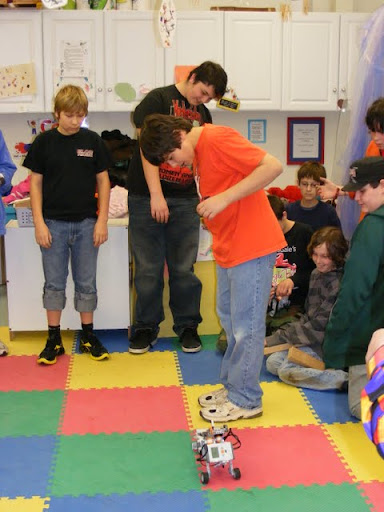
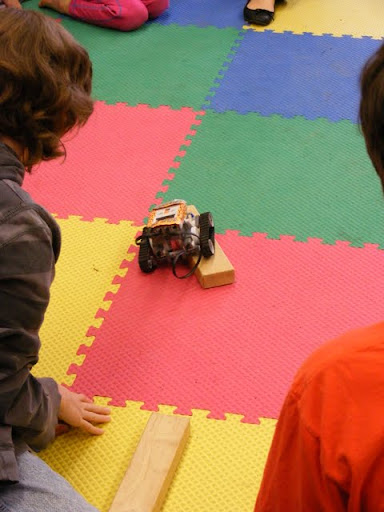
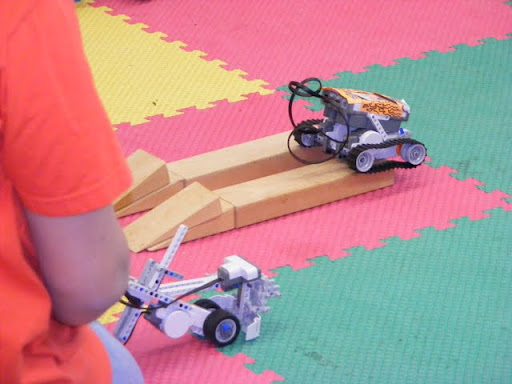
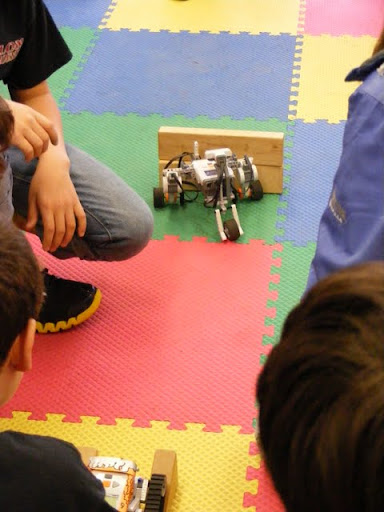
My apologies for taking so long between posts. I've been absorbed in creating robots with our middle schoolers! Here are some pictures from the demonstration the students did for the Early Learner classes:
Thursday, December 9, 2010
Tips for Gamers and Their Parents: ESRB Ratings
It's that time of year - the time when children make gift wish-lists for the holiday season. Often included in these lists are video and computer games. Here's some information regarding the ESRB Rating system.
It is highly recommended that parents pay special attention to the Entertainment Software Rating Board (ESRB) ratings. These ratings can help parents determine the suitability of games for their children, even if the parents themselves have not played the game prior.
Remember that these ratings are designed to help buyers decide which games are appropriate; however, the final decision as to whether a game is okay or not rests solely with a parent or guardian. I recommend checking many sources of information - ESRB ratings, online reviews, and product websites - to determine any game's suitability.
These ratings are as follows:
eC: Early Childhood, appropriate for ages 3+
E: Good for ages 6+
E 10+: Good for anyone 10 years and up
T: Good for teenagers or older (13+)
M: Mature game, good only for adults 17+
Ao: Adults only game, usually includes some kind of sexuality or violence of an exceptional nature.
All games must be rated by the Entertainment Software Rating Board to be on the market. If a game is offered for sale with the label "Rating Pending", it is from a questionable source and should not be purchased. Games with ratings of E 10+ or higher will usually include Content Descriptors, which provide some indications as to why that rating was given. Learn more at: http://www.blogger.com/post-create.g?blogID=735291849989549240
Wednesday, December 1, 2010
Class Notes: Lower Elementary
 This week, lower elementary classes started the Internet Safety unit. Students from Beth's, Katie's and Keri's classes watched a video featuring Faux Paw the Techno Cat! We learned that we should always guard personal information; things like our name, phone number, school, picture, or address should never be posted online or given out to Internet friends.
We will continue our adventures with Faux Paw throughout the month of December. We will learn how to prevent cyber-bullying, how we can all be good digital citizens, and why we should never download files from unknown sources.
Subscribe to:
Posts (Atom)